第 2 章 / 共 14 章
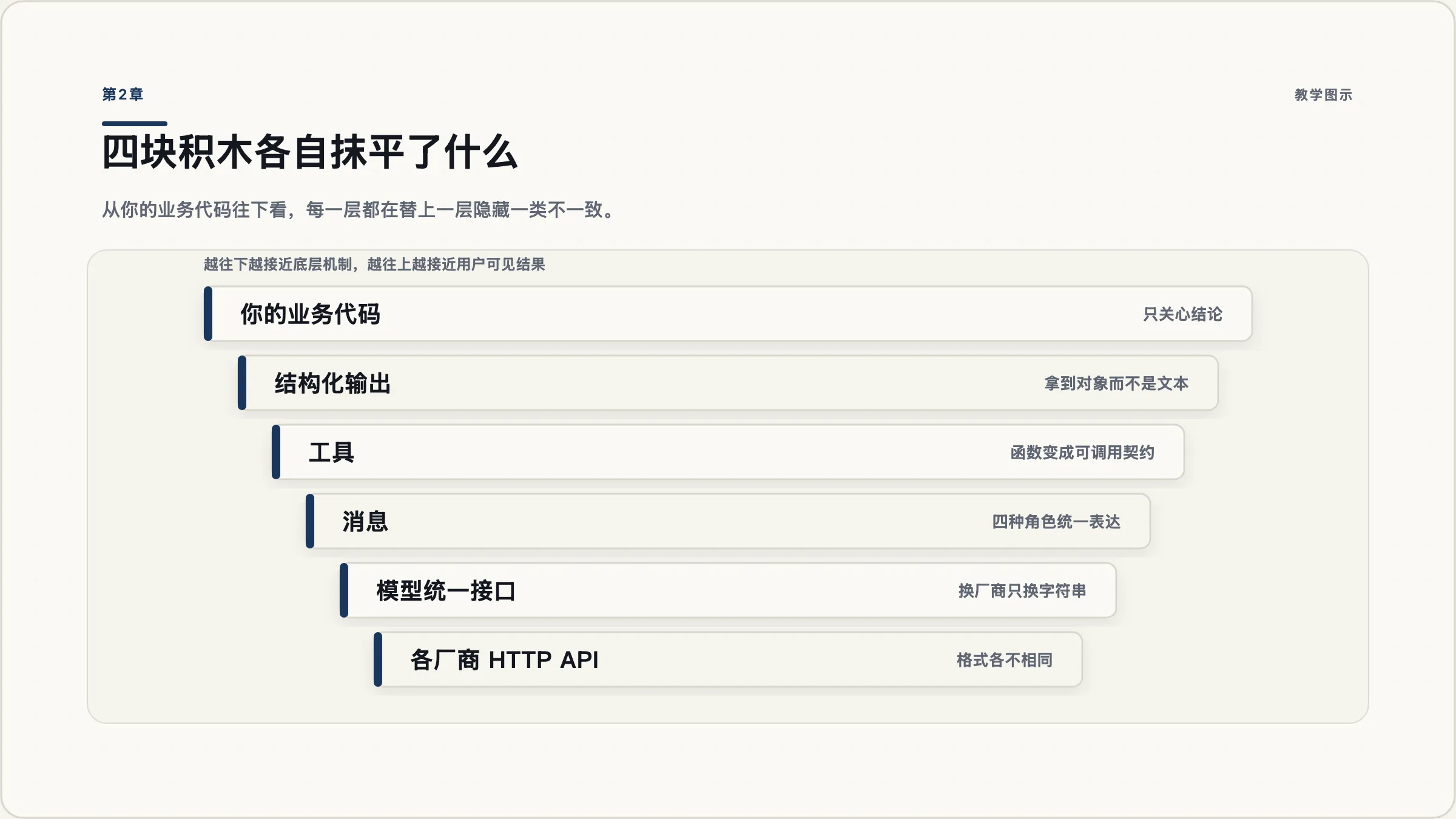
四块积木:模型、消息、工具、结构化输出
2.1 先把项目建起来
uv init --python 3.12 refund-agent
cd refund-agent
uv add langchain langgraph
实测这条命令装出来的版本(2026-09-06):
langchain           1.4.0
langchain-core      1.6.2
langgraph           1.2.11
langgraph-checkpoint 4.2.0
langgraph-prebuilt  1.1.0
langsmith           0.12.2
pydantic            2.13.5
注意 langchain 本身不带任何模型厂商的实现。你还要按需装:
uv add langchain-openai      # 或
uv add langchain-anthropic
这是 1.x 的包结构:langchain 只保留 agents、messages、tools、chat_models、embeddings 五块,厂商实现各自独立成包。你会在下一节看到,这个拆分正是很多旧代码跑不起来的原因。
2.2 你搜到的代码为什么 import 就失败
先做一件让你后面少踩很多坑的事:把下面这段跑一遍,看清楚哪些名字已经不在了。
from langchain.chains import LLMChain真实报错:
ModuleNotFoundError: No module named 'langchain.chains'from langchain.agents import AgentExecutorImportError: cannot import name 'AgentExecutor' from 'langchain.agents'完整对照表(全部为本机在 langchain 1.4.0 上实测):
| 你会搜到的写法 | 实际报错 | 现在应该用 |
|---|---|---|
from langchain.chains import LLMChain | ModuleNotFoundError: No module named 'langchain.chains' | create_agent,或直接 prompt | model |
from langchain.agents import AgentExecutor | ImportError: cannot import name 'AgentExecutor' | create_agent |
from langchain.agents import initialize_agent | ImportError: cannot import name 'initialize_agent' | create_agent |
from langchain.memory import ConversationBufferMemory | ModuleNotFoundError: No module named 'langchain.memory' | LangGraph 的 checkpointer(第 8 章) |
from langchain import hub | ImportError: cannot import name 'hub' | langchain_classic.hub |
from langchain.retrievers import ... | ModuleNotFoundError: No module named 'langchain.retrievers' | langchain_classic.retrievers |
from langgraph.prebuilt import create_react_agent | 不报错,但已标记弃用 | from langchain.agents import create_agent |
最后一行值得单独说。create_react_agent 仍然能导入,不会报错,但它的文档字符串第一段就是弃用警告:
!!! warning
This function is deprecated in favor of `create_agent` from the `langchain` package…如果你确实要维护一份旧项目,官方给了一条退路:装 langchain-classic,把 langchain.chains 之类的导入改成 langchain_classic.chains。但注意 langchain-classic 的最新版停在 2026 年 6 月,而 langchain 与 langchain-core 每周都在更新——这本身就说明了它的定位。
2.3 第一块积木:模型
from langchain.chat_models import init_chat_model

model = init_chat_model("anthropic:claude-sonnet-4-6")
# 或 init_chat_model("openai:gpt-5.5")
init_chat_model 的价值不在于少写一行,而在于模型标识符变成了一个字符串。字符串的形式是 "{provider}:{model}",换厂商就是换字符串,下游代码一行不用动。
它接受的常用参数(照抄官方文档):api_key、temperature、max_tokens、timeout、max_retries(默认 6,指数退避加抖动,429 和 5xx 会自动重试,401/404 这类客户端错误不重试)。
三种调用方式:
model.invoke("这条工单该退款吗?")        # 一次要完
for chunk in model.stream("..."):        # 流式
    print(chunk.text, end="")
model.batch(["工单1", "工单2", "工单3"])   # 客户端并行
batch() 是客户端并行,不是厂商的批处理 API——它只是帮你开多个并发请求,可以用 config={"max_concurrency": 5} 限流。
2.4 第二块积木:消息
四种角色,四个类:
| 类 | 谁产生的 | 用来做什么 |
|---|---|---|
SystemMessage | 你 | 设定角色与规则 |
HumanMessage | 用户 | 输入 |
AIMessage | 模型 | 回复,可能带 tool_calls |
ToolMessage | 你的代码 | 工具执行结果,必须带 tool_call_id |
ToolMessage 有一个很少被讲但非常有用的字段:artifact。
ToolMessage(
    content="找到 3 条匹配订单",          # 这一段会进模型上下文
    tool_call_id="call_123",
    artifact={"order_ids": [...], "raw": {...}},  # 这一段不会
)官方对它的定义是:存放不发给模型、但程序可以访问的补充数据。这是控制上下文成本最直接的一个开关——原始 JSON 留在 artifact 里给你的代码用,给模型的只有一句人话摘要。第 11 章会回到这个话题。
另外一个 1.x 的新东西是标准内容块。不同厂商返回的思考过程叫法不一样(一家叫 thinking,一家叫 reasoning),现在统一用 message.content_blocks 读:
for block in response.content_blocks:
    if block["type"] == "reasoning":
        ...
    elif block["type"] == "text":
...注意默认情况下这些标准块不会被写进 content 字段,content_blocks 是一个惰性解析出来的视图。要让它进 content,需要显式设置 output_version="v1"。
2.5 第三块积木:工具,以及 docstring 的一个陷阱
from langchain.tools import tool

@tool
def lookup_order(order_id: str, include_items: bool = False) -> str:
    """按订单号查询订单状态与金额。

    Args:
        order_id: 订单号,形如 ORD-2026-000123。
        include_items: 是否一并返回商品明细,默认不返回。
    """
...类型注解是必需的,它决定了工具的输入 schema。函数名变成工具名,docstring 变成描述。
现在看一眼这个装饰器实际生成了什么(本机实测输出):
{
  "description": "按订单号查询订单状态与金额。\n\nArgs:\n    order_id: 订单号,形如 ORD-2026-000123。\n    include_items: 是否一并返回商品明细,默认不返回。",
  "properties": {
    "order_id": {"title": "Order Id", "type": "string"},
    "include_items": {"default": false, "title": "Include Items", "type": "boolean"}
  },
  "required": ["order_id"],
  "title": "lookup_order",
  "type": "object"
}改一个字就好:
@tool(parse_docstring=True)实测输出变成:
{
  "description": "按订单号查询订单状态与金额。",
  "properties": {
    "order_id": {"description": "订单号,形如 ORD-2026-000123。", "title": "Order Id", "type": "string"},
    "include_items": {"default": false, "description": "是否一并返回商品明细,默认不返回。", "title": "Include Items", "type": "boolean"}
  },
  "required": ["order_id"]
}两个保留参数名要避开:config 和 runtime。前者留给 RunnableConfig,后者留给 ToolRuntime。用这两个名字当业务参数会在运行时报错。
工具还可以返回结构化数据甚至直接写状态,我们会在第 7 章用到。
2.6 第四块积木:结构化输出
退款助手最终要给出的是一个结构化判断,不是一段散文。
模型层的写法:
from pydantic import BaseModel, Field

class RefundDecision(BaseModel):
    """一条退款工单的处理结论。"""
    should_refund: bool = Field(description="是否应当退款")
    amount: float = Field(description="建议退款金额,单位元")
    reason: str = Field(description="给客服看的一句话理由")

structured = model.with_structured_output(RefundDecision)
result = structured.invoke("工单内容……")
agent 层的写法是 response_format:
agent = create_agent(model=..., tools=[...], response_format=RefundDecision)
result = agent.invoke({"messages": [...]})
print(result["structured_response"])   # RefundDecision(...)
结果放在 structured_response 这个键里,不在 messages 里。
底下有两种策略,传一个裸的 schema 类时框架会自动选:模型和厂商原生支持结构化输出就用 ProviderStrategy,否则退回用「假装调用一个工具」的 ToolStrategy。如果你传的是一个 JSON Schema 字典而不是类,必须自己显式包一层,官方文档专门标了警告说字典不会被自动识别。