第 13 章 / 共 14 章
上线:从一个脚本变成一个服务
13.1 脚本和服务之间差了什么
到第 12 章为止,你的退款助手是一个 Python 脚本:跑一次,处理一条工单。要让客服后台用上它,还差这些:
- 一个能被 HTTP 调用的接口。
- 会话管理:一条工单一个 thread,能列出来、能查状态。
- 恢复接口:审批结果回来时,能找到那条 thread 继续。
- 并发:几十条工单同时在跑。
这些都可以自己用 FastAPI 写,但 LangGraph 官方提供了现成的一层。
13.2 一个配置文件
{
  "dependencies": ["."],
  "graphs": { "refund": "./src/graph.py:graph" },
  "env": ".env"
}
放在项目根目录,叫 langgraph.json。必填的是 graphs(Python 项目还要 dependencies),可选的有 env、auth、checkpointer、store、http、webhooks、api_version、python_version(支持 3.11 / 3.12 / 3.13)。
graphs 里每一项的值是 文件路径:变量名,那个变量必须是编译好的图。
校验一下(实测):
uv run --with "langgraph-cli[inmem]" langgraph validateConfiguration file .../langgraph.json is valid. (1 graph found)13.3 本地跑起来
uv run --with "langgraph-cli[inmem]" langgraph dev --no-browser --port 2024实测启动日志的关键几行:
This in-memory server is designed for development and testing.
For production use, please use LangSmith Deployment.
Starting In-Memory runtime with langgraph-api=0.13.4 and in-memory runtime=0.33.4
Using auth of type=noop
Application started up in 3.555s三点值得注意:它自己声明只供开发测试;默认鉴权是 noop(也就是没有);默认 host 是 127.0.0.1,帮助文本明确写着 0.0.0.0 只应该用在可信网络里。
服务起来之后,那张图自动获得了一整套 REST 接口。下面全部是实测的真实请求与响应:
curl http://127.0.0.1:2024/ok
# {"ok":true}

curl -X POST http://127.0.0.1:2024/assistants/search \
     -H 'content-type: application/json' -d '{"limit":5}'
# [{"assistant_id":"fcb1d0d2-a4d7-5bb4-b10a-57c00fdcb684","graph_id":"refund",
#   "name":"refund","version":1, ...}]

curl -X POST http://127.0.0.1:2024/threads -H 'content-type: application/json' -d '{}'
# {"thread_id":"01a076fc-5a36-7403-aea9-44d4cc23f893", ...}

curl -X POST http://127.0.0.1:2024/threads/<tid>/runs/wait \
     -H 'content-type: application/json' \
     -d '{"assistant_id":"refund","input":{"steps":[]}}'
# {"steps":["hello"]}

curl http://127.0.0.1:2024/threads/<tid>/state
# {"values":{"steps":["hello"]},"next":[],"tasks":[],
#  "metadata":{"graph_id":"refund","langgraph_version":"1.2.11",
#              "langgraph_api_version":"0.13.4", ...}}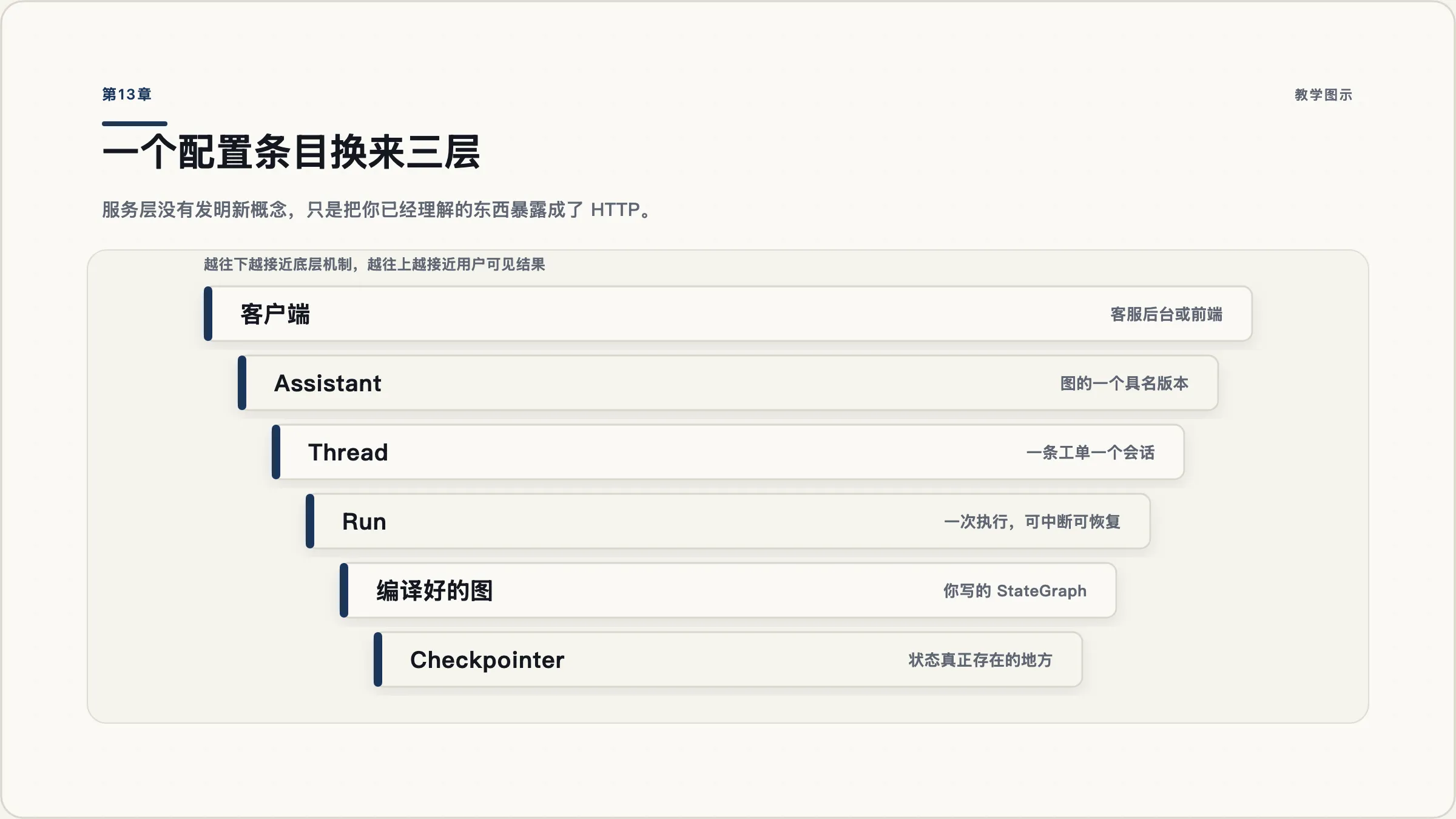
langgraph.json 条目换来三层东西。注意最上面那层——assistant 是带版本号的,这意味着你可以在不改客户端的前提下滚动图的版本。CLI 的其余命令:up(用 Docker 在本地跑)、build(构建镜像)、dockerfile(生成 Dockerfile)、new(从模板建项目)、deploy(标着 Beta)。
langgraph dev 还有几个实用开关:--tunnel(通过 Cloudflare 暴露公网地址,Safari 用户需要)、--debug-port(挂 IDE 调试器)、--no-reload(关热重载)。
13.4 四种部署形态与一条许可证边界
官方列出四种(名称与描述来自当天文档):
| 形态 | 谁在运维 | 需要什么 |
|---|---|---|
| Cloud | 官方托管在 AWS / GCP | Plus 及以上档位 |
| Self-hosted with control plane | 你运维数据面,官方管控制面 | Enterprise |
| Hybrid | 混合 | 视方案 |
| Standalone server | 全部自己来,自带 PostgreSQL、Redis 和 license | 需要 license |
这里有一条必须讲清楚的界线:
- LangGraph 框架本身是 MIT 协议的开源软件。你用
StateGraph写的图,自己拿 FastAPI 包一层部署,完全自由。 - 上面这套部署平台是商业产品。自托管属于 Enterprise 加购,需要 license key。
所以「用 LangGraph 会不会被绑定」这个问题的答案是分层的:框架不会,平台会。如果你的顾虑是绑定,那就把图写好,服务层自己用 FastAPI 包——第 13.1 节列的那四件事,加起来是几百行代码,不是不可承受。
另外提醒一个命名变更:官方文档当前用的名字是 LangSmith Deployment(原 LangGraph Platform)和 Agent Server(原 LangGraph Server)。但包名、CLI 命令、langgraph.json 都没改。你搜到的资料里两套名字会混着出现。
13.5 从模板起步
langgraph new 可以从官方模板建项目。当天实测的模板活跃度(stars / 最近提交):
| 模板 | stars | 最近提交 |
|---|---|---|
react-agent | 838 | 2026-09-03 |
memory-agent | 472 | 2026-09-02 |
new-langgraph-project | 293 | 2026-08-25 |
retrieval-agent-template | 171 | 2026-09-02 |
也有几个已经很久没动的(rag-research-agent-template 停在 2024-12,langgraph-example 停在 2024-10),别照着它们抄,那是 0.x 时代的写法。
前端方面,create-agent-chat-app 这个脚手架虽然存在但最近提交停在 2025-04;活跃的是 agent-chat-ui(3,130 stars,2026-09-02)。
13.6 上线自检清单
按顺序过一遍,每一条都对应前面某一章:
| # | 检查项 | 出处 |
|---|---|---|
| 1 | 依赖锁到了 langchain-core 的补丁版本,不是只锁 langchain | 11.6 |
| 2 | langchain-core 版本不在 CVE-2025-68664 影响范围内 | 11.6 |
| 3 | state 里没有不需要跨步存活的字段 | 6.5 / 8.6 |
| 4 | state 的键名已经定稿(改名会让在途会话丢数据) | 8.5 |
| 5 | 所有带 reducer 的键都想过「并行写怎么办」 | 6.2 |
| 6 | checkpointer 是 Postgres,不是 InMemory | 8.2 |
| 7 | 有 recursion_limit,也有模型调用次数上限 | 7.5 / 4.3 |
| 8 | 危险操作走人工审批,且审批前没有副作用代码 | 9.2 |
| 9 | 外部调用有 retry_policy 且 retry_on 是显式的 | 11.2 |
| 10 | 返回体积大的工具已经改用 artifact | 2.4 / 11.4 |
| 11 | 追踪已接上,或者 debug 事件已落到自己的日志 | 12.1 / 12.4 |
| 12 | 有一份至少二十条的评估数据集和基线数字 | 12.3 |
| 13 | 服务没有暴露在 0.0.0.0 上且没有鉴权 | 13.3 |
| 14 | 知道自己用的是框架(MIT)还是平台(商业授权) | 13.4 |